
LCD and LED Screens: Understanding the Technical Differences
LCD screens rely on liquid crystals that do not produce their own light and therefore require an external backlight source. Originally, this backlight was provided by fluorescent tubes (CCFL), which were progressively replaced by LED backlighting, a more modern and efficient technology.
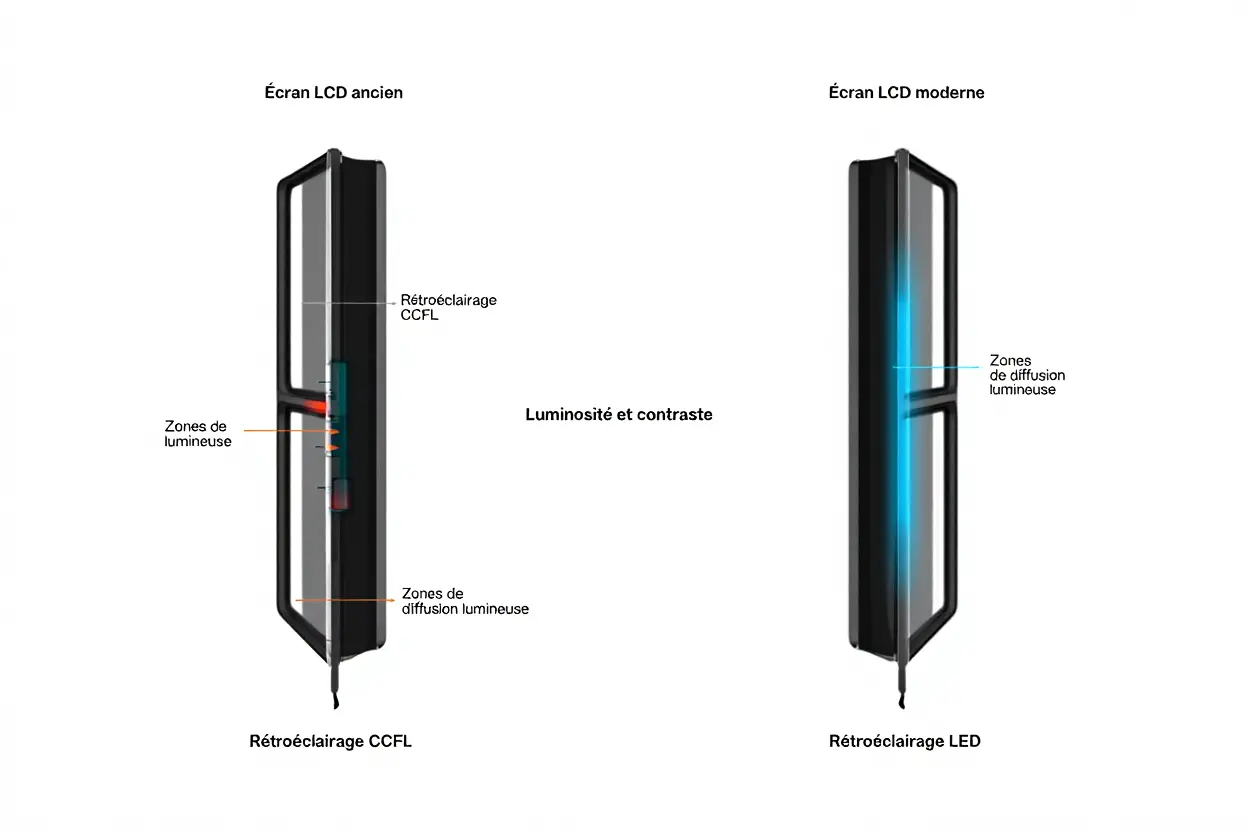
CCFL Backlit vs LED Screens: Impact on Contrast
Traditional CCFL-backlit LCD screens offer a modest contrast ratio, while LED Full-Array models, thanks to localized light control, deliver significantly better performance. This technology allows dimming specific areas, reducing glare and improving visual comfort.
- LED Full-Array Contrast: Approximately 3,000:1 thanks to zone control, limiting halo effects.
- Traditional CCFL LCD Contrast: Around 800:1, with uniform backlighting producing shallow blacks and sometimes harsh brightness.
- LED Edge-Lit Uniformity: Approximately 1,500:1, although light leakage can worsen eye strain.
Older LCD models often display less vibrant colors and grayish blacks, forcing users to increase brightness for better output. These poor settings accelerate eye fatigue, especially during work sessions exceeding eight hours. Good contrast is therefore essential for your eyes well-being.
Brightness and Energy Consumption of Both Screen Technologies
LED backlighting is far more energy-efficient and can offer brightness adapted to various environments, from the office to outdoors, unlike more limited CCFL systems. This efficiency translates not only to better image quality, but also to a significant reduction in electrical consumption.
- LED Consumption: Only 15 to 25 W for a 27-inch screen, with dynamic adaptation.
- CCFL Consumption: Between 30 and 50 W for the same size, with fixed brightness.
- Thermal Reduction: LCD screens with LED backlighting generate less heat, which limits air dryness and helps preserve the tear film.
Thanks to their low heat output, modern screens help reduce the risk of eye dryness during extended use. Working in front of a screen that stays cool is important for maintaining optimal eye hydration.
Many recent models are equipped with sensors that automatically adjust brightness based on ambient light, offering gentle lighting in the dark and more intense light in brighter conditions. This smart adaptation avoids tedious manual adjustments and effectively prevents glare.
Lifespan and Lighting Uniformity
LED diodes maintain stable brightness for tens of thousands of hours, significantly surpassing the longevity of old fluorescent tubes. This durability ensures consistent display quality over the long term, a crucial asset for demanding professional use.
The lighting uniformity provided by LED Full-Array systems is excellent, eliminating the light variations that force the eye to constantly readjust. A homogeneous distribution of light across the entire screen guarantees superior visual comfort on a daily basis.
Blue Light and Screen Flickering: Risks for Your Eyes
All modern screens emit blue light in a light spectrum of 380 to 500 nm. However, LED technologies generally produce a higher amount of blue light than the old CCFL systems. It is therefore crucial to understand this phenomenon to preserve your eye health and make the right equipment choice.
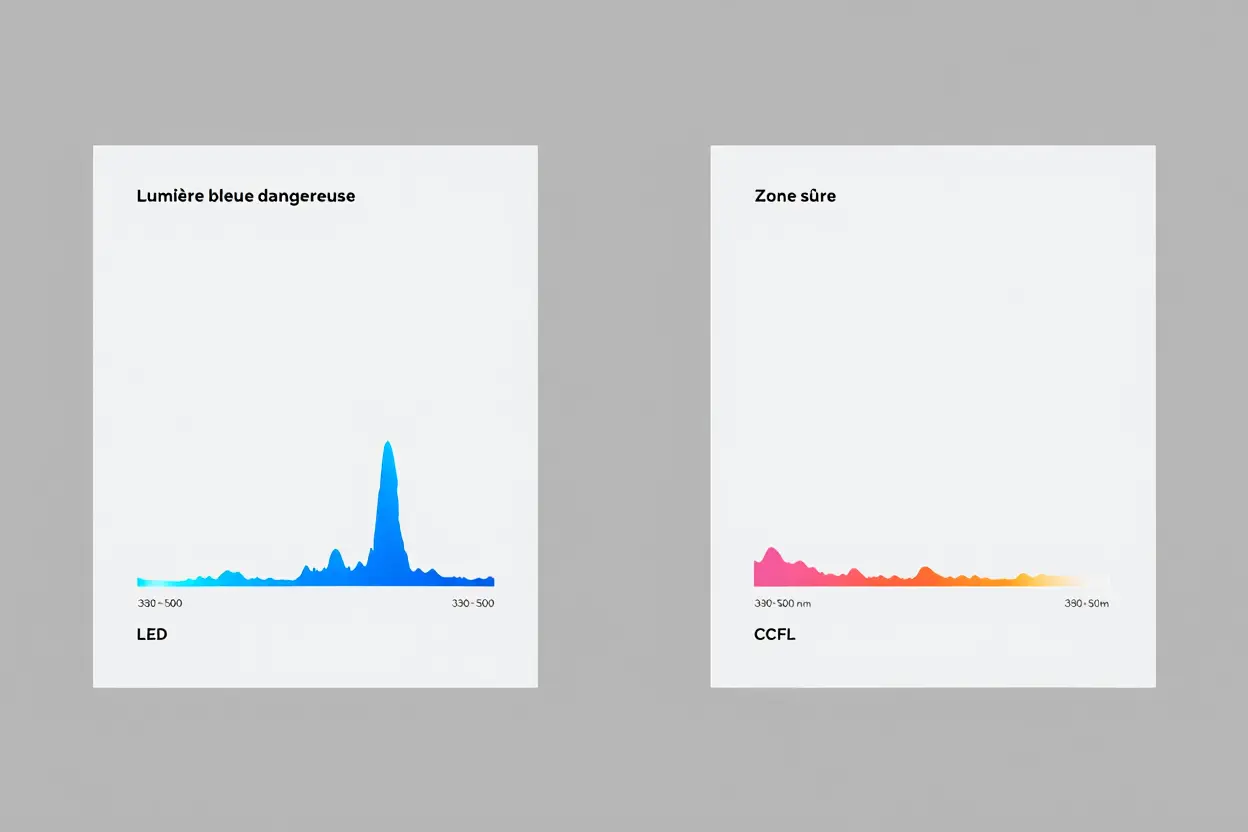
Blue Light Emission: LCD vs LED Screens
On backlit LED screens, blue light is produced by the combination of a blue diode and a yellow phosphor to achieve a white tone. This technique generates a higher amount of blue light than old CCFL tubes, exposing your eyes more intensely, especially in the evening.
Prolonged exposure to this light late in the day can inhibit melatonin production, disrupting your circadian rhythm and potentially causing sleep problems. Fortunately, most recent screens include protection modes (such as Low-Blue-Light or Night Mode) that reduce this harmful component by 30 to 40%.
PWM Flickering and Eye Strain
Many LED screens use Pulse Width Modulation (PWM) to adjust brightness: the backlight flickers very quickly when the intensity decreases. Although very fast (between 200 and 500 Hz), this PWM flickering can fatigue the most sensitive eyes and cause headaches or a noticeable sensation of visual discomfort.
- 200 Hz PWM: Flickering remains perceptible and can trigger migraines, making it unsuitable for long work sessions.
- 1,200 Hz PWM: At this frequency, flickering becomes invisible, ensuring optimal visual comfort even during intensive use.
- DC dimming without PWM: This is the ideal solution for eye health, as it completely eliminates any flicker effect.
CCFL backlighting allowed brightness to be reduced progressively without abrupt interruptions, almost entirely limiting flickering. Today, modern LED screens equipped with DC dimming offer comparable, even superior, comfort while being more energy-efficient than old CCFL models.
Software and Hardware Protection Solutions
QLED screens use a quantum dot layer that acts as a natural filter, reducing part of the blue light spectrum directly at the source. This technology preserves color fidelity while representing one of the most advantageous options for your eye health.
Applications like f.lux or Night Shift automatically adjust the screen color temperature, adopting warmer tones in the evening. While this slightly modifies contrast and color reproduction, which can bother graphics professionals, this method is very effective for improving visual comfort during prolonged desk use.
| Technology | Blue light emission | Blue-light protection mode | Eye health recommendation |
| Standard white LED | High (100%) | Yes, 30–40% reduction | Enable night mode after 6 PM |
| Classic CCFL LED | Moderate | No or basic | Use third-party software (f.lux) |
| QLED Quantum Dots | Reduced (native filter) | Yes, enhancement possible | Best comfort-image ratio |
| OLED self-emissive pixels | Moderate to high | Yes, pixel-level control | Excellent contrast, burn-in risk |
LCD and OLED Screens: Choosing Based on Your Daily Use
The choice between these screen technologies will mainly depend on your usage, whether professional or personal, as well as your habits. Each technology offers distinct advantages and involves certain compromises, especially regarding your priorities in terms of visual comfort.
Screen Recommendations by Activity Type: Office, Gaming, Graphics
For intensive desk use, an LED screen of IPS type is recommended, with the blue light filter enabled. Adjust brightness between 120 and 180 cd/m2 in a softly lit room and maintain a good distance to preserve your eye health.
- Office: Prefer an IPS LED screen of at least 60 Hz with a reduced blue light mode, a contrast ratio of about 1,500:1, and a matte panel.
- Competitive Gaming: Opt for Full-Array technology at 144 Hz or higher, offering fast response to limit visual fatigue during rapid movements.
- Professional Graphics: Choose a pre-calibrated IPS panel covering a wide color gamut, with high contrast, and disable blue light filters for precise retouching.
In gaming, high refresh rate screens help reduce motion blur. This fluidity is essential for preventing eye pain and visual fatigue after long sessions on dynamic content.
Advantages and Limitations of OLED Screens for Your Eyes
Thanks to the individual extinction of their pixels, OLED screens offer a striking contrast ratio exceeding 10,000:1, virtually eliminating any glare. However, the debate between LCD and OLED is nuanced by OLED higher cost and sometimes shorter lifespan.
For cinema fans or gamers in dark conditions, OLED guarantees superior visual comfort thanks to its perfect blacks and absence of light halos. However, the risk of screen burn-in often makes it less suitable for intensive, static desk use.
In comparison, LCD offers a better durability-to-price ratio, while OLED stands out with its deep blacks but remains more expensive. For most users concerned about their eye health, a well-configured LED screen is often the most balanced choice.
Good Ergonomics and Ambient Lighting Practices
It is essential to place your monitor at a distance of 40 to 60 cm, slightly tilted downward to reduce eye muscle tension. Adjustable stands significantly improve posture and visual comfort during long working days.
Pay attention to your ambient lighting by using soft, warm light sources to soften the harsh contrast with the screen. Whether you use LED or LCD screens, these adjustments create a healthy working environment that protects your vision in the long term.
Frequently Asked Questions
Which Is the Best Screen for Your Eyes: LED or LCD?
LED screens generally offer superior visual comfort compared to traditional LCD models. Their direct and localized backlighting allows for deeper blacks and higher contrast, which helps reduce glare.
Many recent models also integrate blue light filters and automatic night modes, designed to reduce eye strain. Their low energy consumption and long lifespan also represent significant advantages.
On the other hand, traditional LCD screens use uniform lighting that can limit contrast and fatigue the eyes more in a poorly lit environment. Thus, an LED screen for eyes that is well designed is often preferable for your eye health, although good extended use practices remain essential.
Do LED Screens Fatigue More Than LCD?
No, an LED screen is not necessarily more fatiguing than an LCD. It primarily depends on the brightness setting and the flicker rate. A well-calibrated LED screen, with a high refresh rate, can actually be more restful for the eyes than an old, poorly configured LCD monitor.
It is true that LCD panels often offer comfortable viewing angles and fine resolution, particularly appreciated in a professional environment. The choice between LED vs LCD for eyes therefore depends more on the quality of settings and your usage than on the technology itself.
To guarantee optimal visual comfort, prefer a screen with anti-flickering technology and adjust its brightness to your environment. Following the 20–20-20 rule (looking away every 20 minutes) remains one of the best tips, regardless of your screen technology.
How to Reduce Eye Strain Caused by Blue Light from LED Screens?
Reducing eye strain related to blue light requires a multi-faceted approach, especially during extended use. Activate night mode or the warm light setting in the evening to soften the screen tones, or use applications that automatically adjust color temperature.
Wearing glasses with a blue light filter is highly recommended if you spend more than eight hours daily in front of a screen. Also make sure to adjust your screen brightness according to the ambient lighting of your room to minimize the strain on your eyes.
Some modern LED screens integrate native blue light protection, filtering harmful wavelengths without distorting colors. Finally, take regular breaks and do not forget to blink frequently to preserve your eye health in the long term.